Your membership command center

One dashboard for the work behind better trading.

The Code Guardian dashboard brings tools, service requests, account support, coaching, updates, analytics, and developer resources into one organized member workspace.
Centralized requestsPrivate member resourcesClear service status
Member Overview
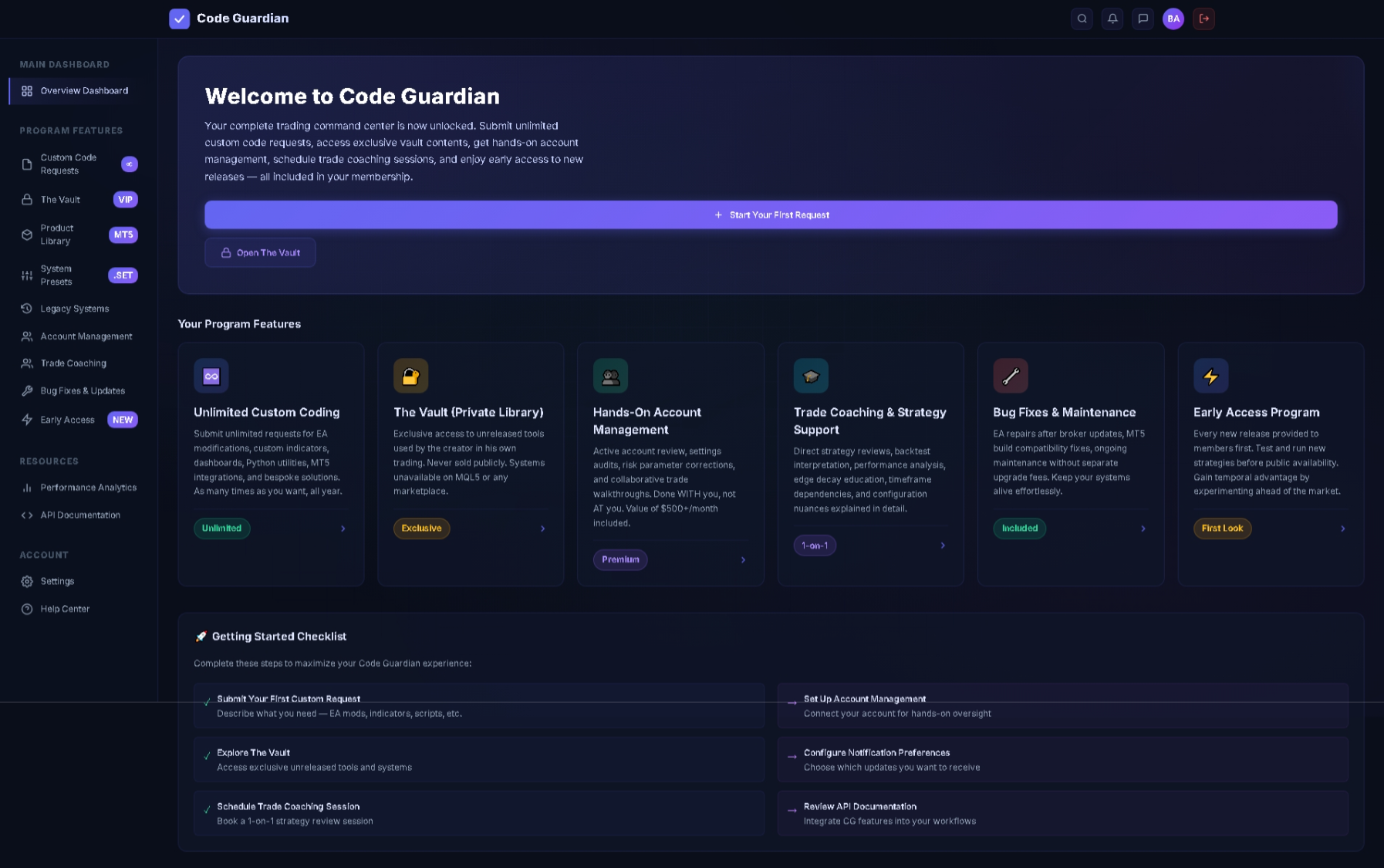
Code Guardian member dashboard overview showing program features and getting started tasks
One loginTools, requests, support, and resources
OverviewCustom CodingThe VaultAccount ManagementTrade CoachingAnalyticsAPI Resources

Built for follow-through

Less searching.
More structured action.

A large membership can become difficult to use when resources are scattered across email, downloads, chats, and disconnected forms. The dashboard creates a single starting point for understanding what is included and deciding what to do next.

Members can move from discovery to action: review available program features, open private resources, submit a coding request, connect an account review, schedule coaching, report an issue, or read integration documentation.

What the workspace organizes

A complete membership, arranged by task.

01

Overview dashboard

See program features, shortcuts, membership resources, and a getting-started checklist from one landing screen.

02

Custom code requests

Submit and organize requests for EA changes, indicators, utilities, scripts, dashboard widgets, and bespoke technical work.

03

Private tool access

Open The Vault, product library, system presets, and legacy systems without searching across separate delivery channels.

04

Human support

Request account review, strategy support, trade coaching, bug fixes, compatibility work, and ongoing maintenance.

05

Early access

Find member-first releases and new systems in a dedicated area designed for testing and feedback.

06

Technical resources

Reach performance analytics and API documentation for members building more advanced workflows.

01 · Member overview

Know what you have—and where to begin.

The overview dashboard acts as the front door to the program. A welcome panel explains the membership, while feature cards expose the major services without requiring members to remember where each resource lives.

  • Quick orientation: Major services are visible immediately after login.
  • Getting-started checklist: New members receive practical next actions such as submitting a request, exploring The Vault, scheduling coaching, and configuring notifications.
  • Status labels: Visual tags distinguish unlimited, exclusive, premium, included, one-to-one, and early-access benefits.
  • Consistent navigation: The persistent sidebar keeps tools, services, analytics, documentation, settings, and help within reach.
Overview of the Code Guardian dashboard with membership feature cards and a getting started checklist
Overview DashboardProgram features and onboarding actions are presented in a single command center.

02 · Embedded development service

Turn a trading requirement into a clear coding request.

The custom coding workspace gives members a structured route for asking for technical changes instead of relying on unorganized messages. It makes the range of supported work visible before a request begins.
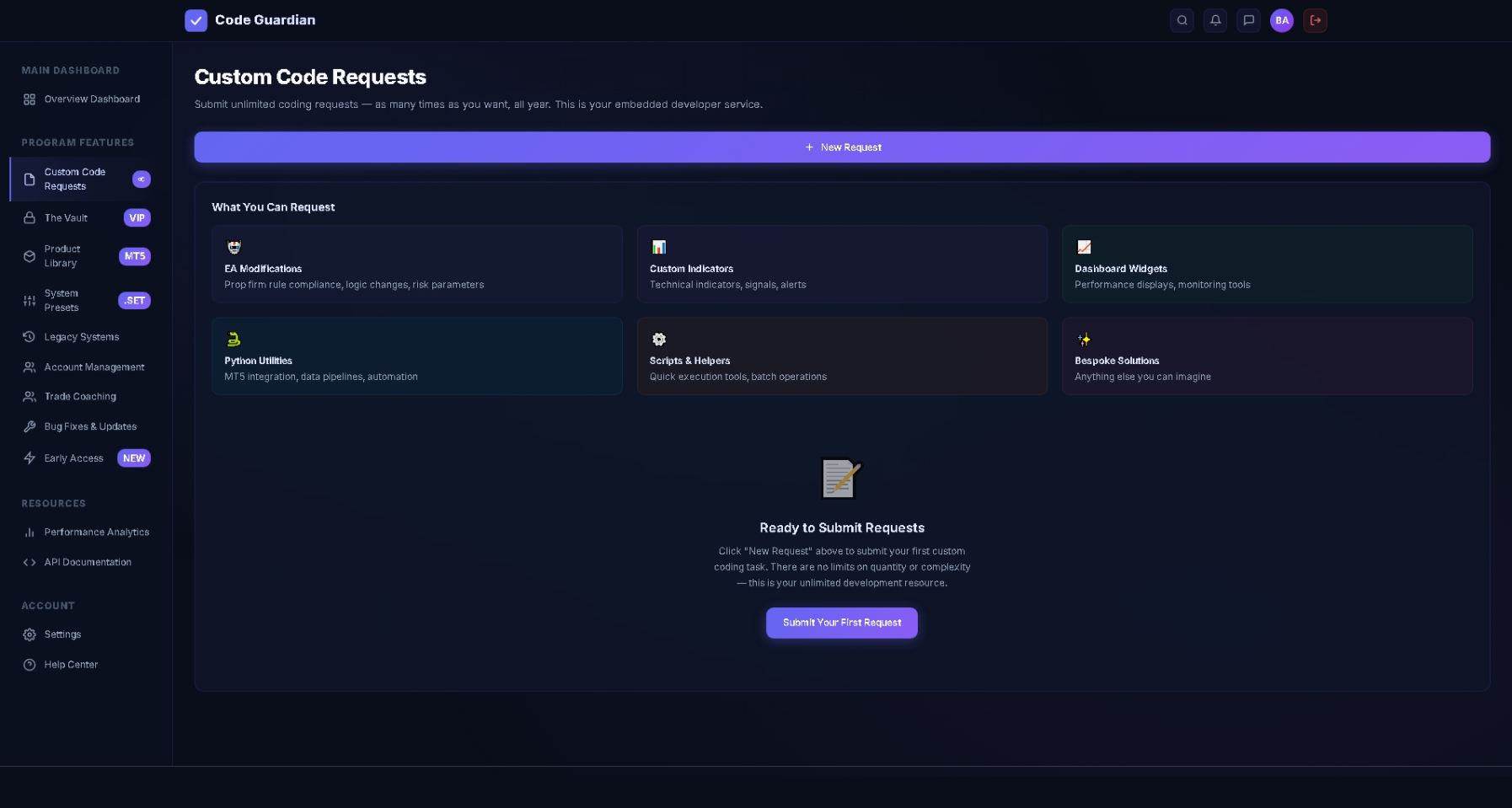
  • EA modifications: Request logic changes, rule-compliance updates, or risk-parameter adjustments.
  • Custom indicators: Describe technical studies, visual signals, and alert requirements.
  • Dashboard widgets: Request monitoring panels, performance displays, or workflow components.
  • Python utilities: Outline MT5 integrations, data pipelines, and automation helpers.
  • Scripts and helpers: Request batch operations and focused execution utilities.
  • Bespoke solutions: Capture specialized requirements that do not fit a standard category.
Member benefitThe request categories help users define the desired outcome before development starts, reducing ambiguity and keeping project context attached to the request.
Code Guardian custom coding request dashboard showing EA modifications, custom indicators, Python utilities, scripts, and bespoke solutions
Custom Code RequestsA dedicated intake area makes technical requests easier to define and submit.

03 · Hands-on account support

Move from general advice to account-specific review.

The account-management area is designed for collaborative oversight. Members can select a service, choose a priority level, explain the account context, and submit a focused review request from the same interface.

  • Live account review: Provide account context for a direct examination of current setup and behavior.
  • Settings audit: Review configuration choices and optimization concerns.
  • Risk-parameter correction: Identify settings that may create unwanted exposure before they compound.
  • Trade walkthroughs: Discuss trades and decisions collaboratively rather than receiving an unexplained output.
  • Structured intake: Service type, priority, and detailed notes make the request easier to route and understand.

Account support and analytical tools do not remove trading risk or guarantee performance. Members remain responsible for brokerage access, trade authorization, and live-fund decisions.
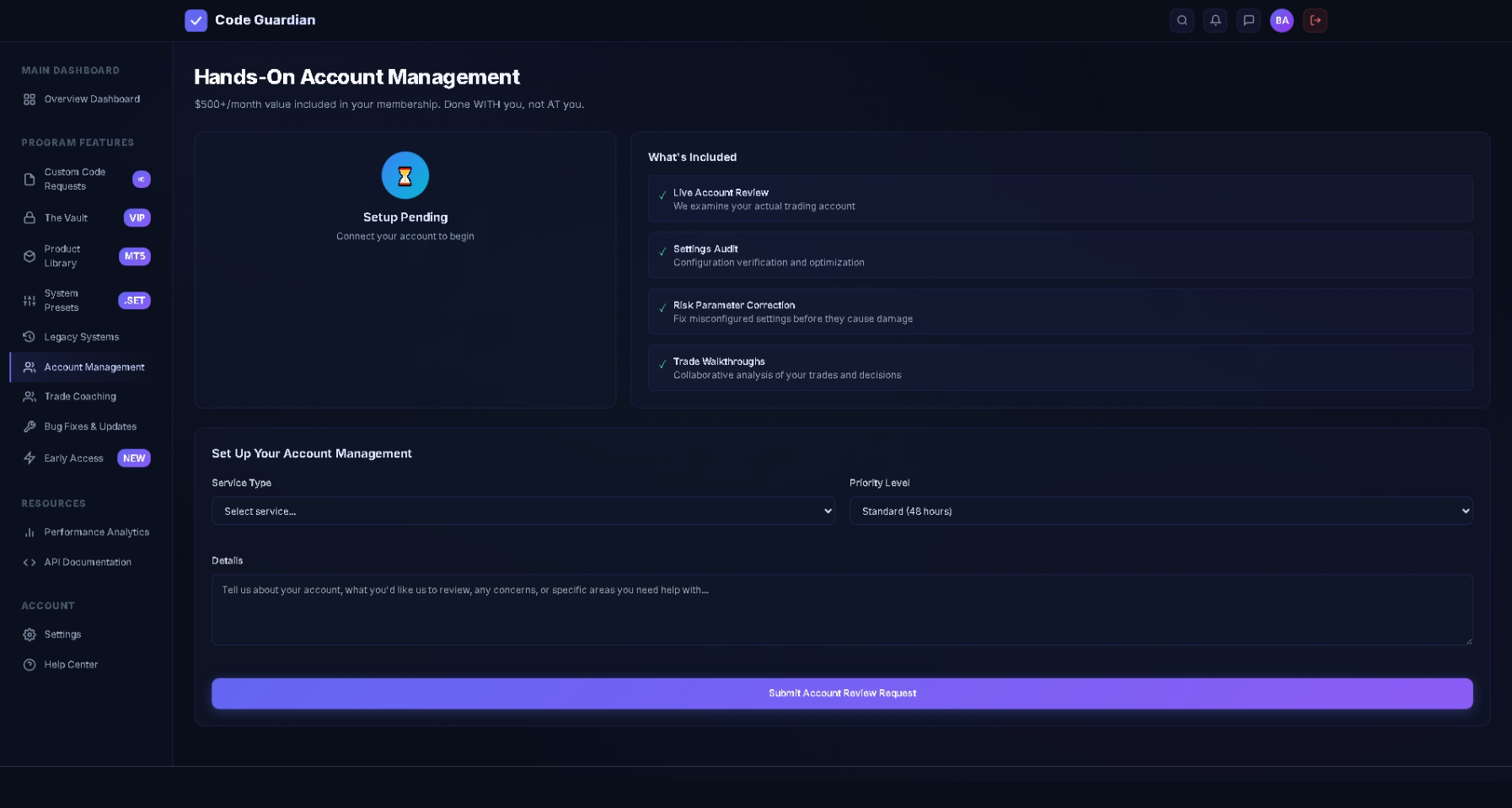
Code Guardian account management dashboard showing live account review, settings audit, risk correction, and trade walkthrough features
Account ManagementService selection and request details are collected in one accountable workflow.

04 · Developer and automation resources

Connect advanced workflows without leaving the member area.

The API documentation view gives technically experienced members a place to understand available integration patterns. A quick-start example, endpoint reference, and transport options are presented in a familiar developer-documentation layout.
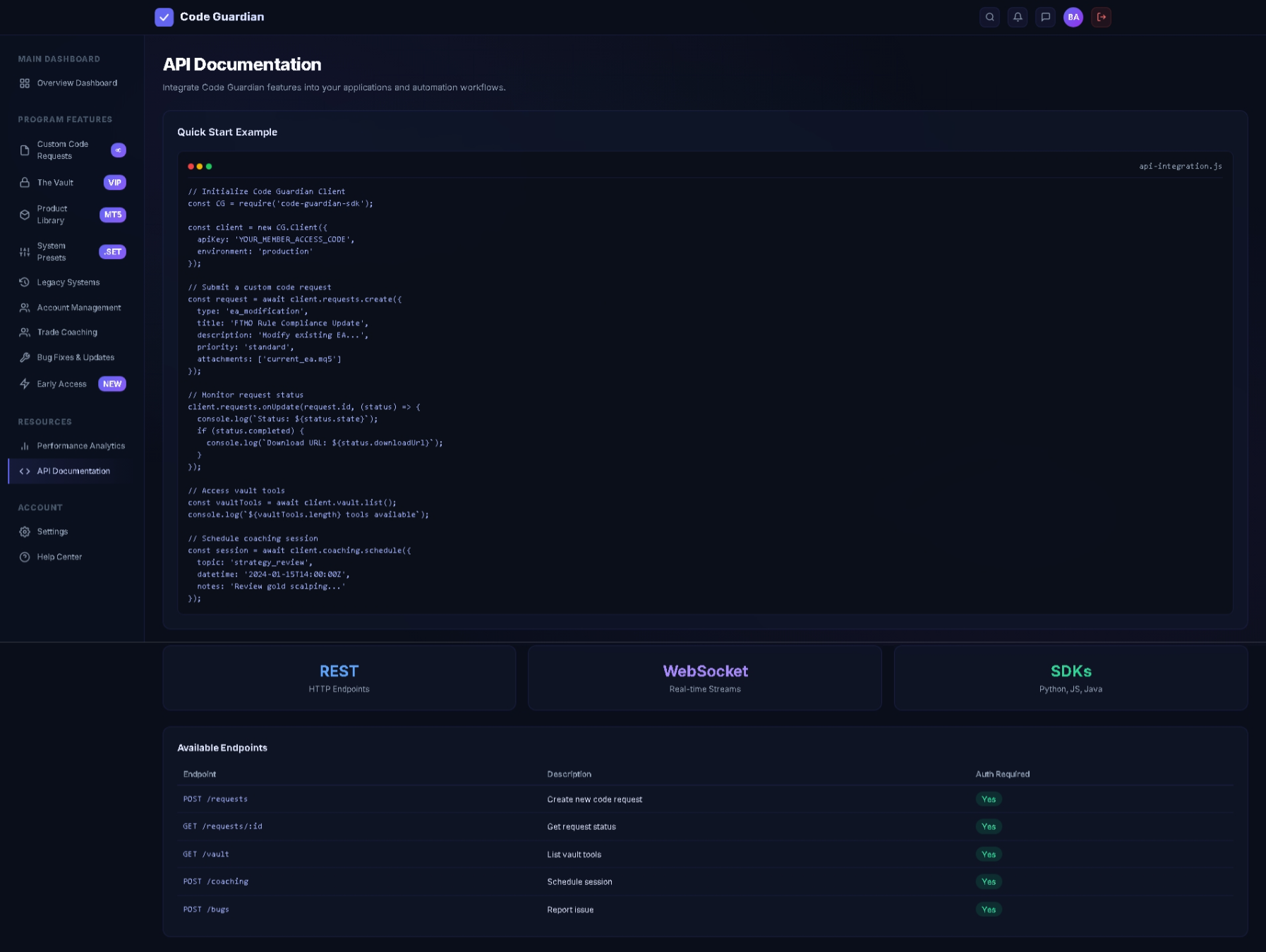
  • Quick-start guidance: See the general client setup and request flow in one example.
  • REST endpoints: Review request-oriented HTTP operations and authentication requirements.
  • Real-time streams: Identify WebSocket-oriented use cases where live status matters.
  • SDK references: Discover supported development paths shown for Python, JavaScript, and Java.
  • Endpoint directory: Scan available operations for requests, status, vault access, coaching, and issue reporting.
Who this helpsDevelopers, technically capable traders, and teams that want to connect dashboard actions with their own internal tools or automation processes.
Code Guardian API documentation dashboard showing a quick start example, REST, WebSocket, SDK, and endpoint information
API DocumentationTechnical members receive a structured reference for supported integration workflows.

Why the dashboard matters

The benefit is not another screen.
It is operational clarity.

01

Faster access to member value

Feature cards and persistent navigation reduce the time spent searching for tools, forms, support, and documentation.

02

Better request context

Dedicated intake paths keep the service type, desired outcome, priority, and supporting details together.

03

Clearer onboarding

A practical checklist helps new members take useful first steps rather than entering an empty portal with no direction.

04

One consistent workflow

Coding, coaching, account support, maintenance, resources, analytics, and help share one predictable interface.

05

Room to grow

Beginners can start with guided actions while advanced users can move into analytics, presets, API references, and automation resources.

Code Guardian membership

See the tools. Understand the workspace. Decide with context.

Review the full tool catalog, compare membership options, or sign in if you already have access.

Browse all 234 toolsView pricingMember login →